BDP and TCP Window Sizing: Complete Guide to Bandwidth-Delay Product
Published on June 3, 2026 · Niwo
- What is Bandwidth-Delay Product (BDP)?
- Why BDP matters for TCP
- How TCP Window Size Affects Throughput
- Window too small = idle link
- Window too large = congestion
- The Goldilocks zone
- The BDP Formula Explained
- Step 1: Know your bandwidth in bits per second
- Step 2: Measure RTT in seconds
- Step 3: Multiply and convert to bytes
- Real calculation: 1 Gbps at 100 ms RTT
- Quick formula for rough estimates
- BDP Examples by Scenario
- Analysis
- TCP Window Scaling
- Why 64 KB isn’t enough
- RFC 1323: TCP Window Scaling Option
- How to verify window scaling is enabled
- TCP auto-tuning in modern OS
- How to Calculate Optimal TCP Window
- Formula
- Example 1: 1 Gbps WAN link with 80 ms RTT
- Example 2: 10 Gbps intercontinental link with 180 ms RTT
- Example 3: 4G LTE with 50 ms RTT and 50 Mbps
- Example 4: Satellite (Starlink) with 40 ms RTT and 200 Mbps
- Linux TCP Tuning
- Key sysctl parameters
- Complete tuning snippet for high-BDP links
- Verify your settings are working
- Important considerations
- Frequently Asked Questions
- What is a good TCP window size?
- How to calculate BDP?
- What is TCP window scaling?
- What is the TCP throughput formula?
- How to check TCP window size in Linux?
- Does BDP apply to UDP?
- What happens if my window is larger than BDP?
- Conclusion
- Key takeaways
- Put this knowledge to work
What is Bandwidth-Delay Product (BDP)?
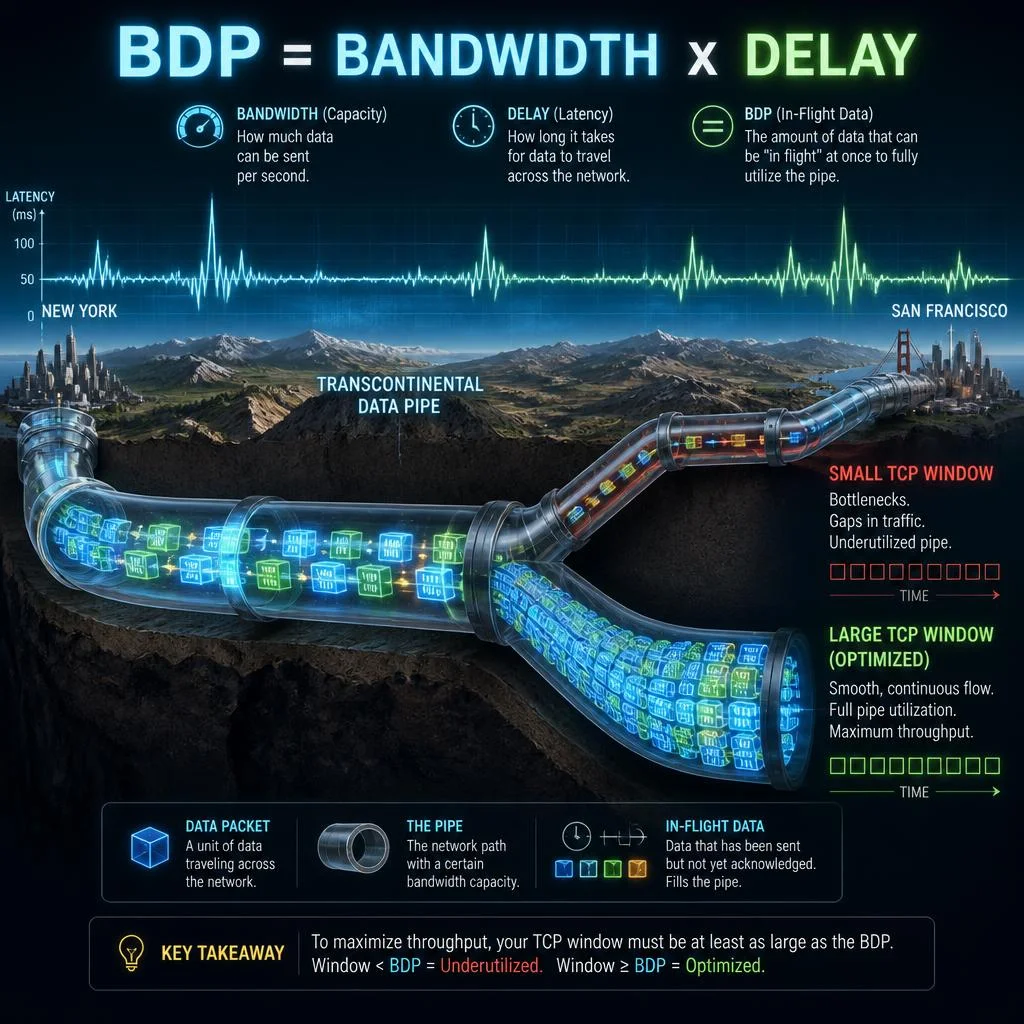
Bandwidth-Delay Product (BDP) is a fundamental metric in TCP/IP networking that represents the maximum amount of data that can be “in flight” — transmitted but not yet acknowledged — on a network link at any given time. It is the product of the link’s bandwidth (capacity in bits per second) and its round-trip time (RTT in seconds):
BDP = Bandwidth × RTTThe result is a quantity of data, measured in bits or bytes, that directly determines the minimum TCP window size required to achieve full link utilization. If your TCP window is smaller than the BDP, the sender will run out of data to transmit while waiting for acknowledgments, leaving the link idle and wasting available bandwidth.
Networks where the BDP exceeds 10⁵ bits (12,500 bytes) are classified as Long Fat Networks (LFNs) per RFC 1072. This category includes most modern high-speed connections: gigabit Ethernet, 4G/5G cellular, satellite links, and intercontinental fiber routes.
Why BDP matters for TCP
TCP is a sliding-window protocol. The sender can only transmit up to one window’s worth of data before it must stop and wait for acknowledgments (ACKs). Without a sufficiently large window, the sender cannot keep the pipe full:
- Window < BDP: The link is underutilized. The sender periodically goes idle waiting for ACKs, reducing effective throughput below the available bandwidth.
- Window ≥ BDP: The sender can continuously stream data. ACKs arrive just as new data needs to be sent, achieving maximum throughput.
This relationship is the foundation of TCP performance tuning. Every network engineer, DevOps professional, and system administrator who manages high-throughput connections needs to understand BDP to diagnose performance bottlenecks and configure systems correctly.
How TCP Window Size Affects Throughput
The TCP receive window (rwnd) is the amount of data the receiver is willing to accept at any moment. The sender uses the minimum of rwnd and its own congestion window (cwnd) to determine how much data it can transmit before receiving an ACK.
Window too small = idle link
When the window is smaller than the BDP:
Bandwidth: 1 Gbps
RTT: 100 ms
BDP = 1,000,000,000 bps × 0.1 s = 100,000,000 bits = 12.5 MB

Window: 64 KB (default without scaling)
Data in flight: 64 KB
Link utilization: 64 KB / 12,500 KB = 0.5%
The link is idle 99.5% of the time. The sender blasts 64 KB, then waits 100 ms for ACKs, then blasts another 64 KB. This is the single most common cause of poor TCP throughput on high-latency links.
Window too large = congestion
An excessively large window can cause problems too:
- Bufferbloat: Oversized buffers in routers and switches delay packets unnecessarily, increasing RTT and degrading interactive applications
- Retransmission storms: If a window is too large relative to the path capacity, a single packet loss can trigger massive retransmissions
- Peer memory exhaustion: The receiver must allocate buffer space equal to the advertised window
The Goldilocks zone
The optimal TCP window size is equal to or slightly larger than the BDP. At this point:
- The pipe is always full (maximum theoretical throughput)
- ACK-clocked pacing keeps bursts manageable
- A single loss event affects a predictable amount of data
🔢 Calculate the exact optimal window for your network in seconds with our BDP Calculator — enter bandwidth and RTT, and get the recommended TCP buffer sizes instantly.
The BDP Formula Explained
The BDP formula is deceptively simple, but understanding its units is critical:
Step 1: Know your bandwidth in bits per second
Always convert to bits per second before calculating. Common conversions:
| Link speed | Bits per second |
|---|---|
| 100 Mbps | 100,000,000 bps |
| 1 Gbps | 1,000,000,000 bps |
| 10 Gbps | 10,000,000,000 bps |
| 100 Gbps | 100,000,000,000 bps |
Step 2: Measure RTT in seconds
RTT is the time between sending a packet and receiving its acknowledgment. Use ping or mtr to measure baseline RTT. Convert milliseconds to seconds:
- 50 ms = 0.05 s
- 100 ms = 0.1 s
- 300 ms = 0.3 s
- 600 ms = 0.6 s
Step 3: Multiply and convert to bytes
BDP (bits) = Bandwidth (bps) × RTT (seconds)
BDP (bytes) = BDP (bits) / 8
Real calculation: 1 Gbps at 100 ms RTT
BDP = 1,000,000,000 bps × 0.1 s
    = 100,000,000 bits
    = 12,500,000 bytes
    ≈ 12.5 MB
This means the TCP window must be at least 12.5 MB to fully utilize a 1 Gbps link with 100 ms RTT. The default TCP window of 64 KB (without window scaling) can only fill 0.5% of this pipe.
Quick formula for rough estimates
Forgetting to convert units? Use this simplified version:
BDP (MB) = Bandwidth (Gbps) × RTT (seconds) × 125Check: 1 Gbps × 0.1 s × 125 = 12.5 MB ✓
Or for bytes directly:
BDP (bytes) = Bandwidth (Mbps) × RTT (ms) × 125Check: 1,000 Mbps × 100 ms × 125 = 12,500,000 bytes = 12.5 MB ✓
BDP Examples by Scenario
Different network environments produce vastly different BDP values. Here is a representative table across common scenarios:
| Scenario | Bandwidth | RTT | BDP (bytes) | BDP (human) | Min window needed |
|---|---|---|---|---|---|
| Gigabit LAN | 1 Gbps | 0.5 ms | 62.5 KB | 62.5 KB | 64 KB |
| Fast LAN | 100 Mbps | 1 ms | 12.5 KB | 12.5 KB | 16 KB |
| DOCSIS Cable | 200 Mbps | 20 ms | 500 KB | 500 KB | 512 KB |
| Residential DSL | 20 Mbps | 30 ms | 75 KB | 75 KB | 128 KB |
| 4G/LTE Cellular | 50 Mbps | 50 ms | 312.5 KB | 312 KB | 384 KB |
| 5G Cellular | 500 Mbps | 15 ms | 937.5 KB | 937 KB | 1 MB |
| Enterprise WAN | 100 Mbps | 80 ms | 1.0 MB | 1 MB | 1 MB |
| Transcontinental (fiber) | 1 Gbps | 150 ms | 18.75 MB | 18.75 MB | 19 MB |
| Satellite (geostationary) | 50 Mbps | 600 ms | 3.75 MB | 3.75 MB | 4 MB |
| Satellite (Starlink) | 200 Mbps | 40 ms | 1 MB | 1 MB | 1 MB |
| Intercontinental (10G) | 10 Gbps | 200 ms | 250 MB | 250 MB | 256 MB |
| Research (100G, cross-Atlantic) | 100 Gbps | 100 ms | 1.25 GB | 1.25 GB | 1.5 GB |
🧮 See any scenario that matches your network? Use our BDP Calculator to compute exact values for your specific bandwidth and RTT.
Analysis
- LAN connections are rarely BDP-constrained — even a modest 64 KB window can saturate a 1 Gbps link with sub-millisecond RTT
- WAN and intercontinental links are the most BDP-sensitive — a 1 Gbps transatlantic connection needs a ~19 MB window
- Satellite links combine moderate bandwidth with very high latency, making BDP tuning critical for acceptable performance
- Cellular networks have moderate BDP values but variable RTT under load, requiring adaptive window sizing
- High-speed research networks (100 Gbps, 100+ ms RTT) push BDP into gigabytes, requiring careful kernel and hardware tuning
TCP Window Scaling
The original TCP specification (RFC 793, 1981) defined the window field as a 16-bit value, limiting the maximum window to 65,535 bytes (64 KB). This was perfectly adequate for the networks of the early 1980s — links were slow and delays were small.
Why 64 KB isn’t enough
A 64 KB window limits TCP throughput to:
Max throughput = Window / RTT = 65,535 bytes / 0.1 s = 655,350 B/s ≈ 5.2 MbpsOn a modern 1 Gbps link with 100 ms RTT, this means using only 0.5% of available bandwidth. Even on a low-latency 1 Gbps LAN (0.5 ms RTT), a 64 KB window caps throughput at ~1 Gbps — barely enough for a single stream.
RFC 1323: TCP Window Scaling Option
RFC 1323 (1992) introduced the TCP Window Scale option — a three-byte TCP header option that adds a scale factor (shift count) to the window field:
Effective Window = Window Field × 2^Scale FactorThe scale factor (0 to 14) is negotiated during the TCP three-way handshake. Each side advertises its scale factor in the SYN and SYN-ACK segments:
| Scale factor | Max window |
|---|---|
| 0 (no scaling) | 64 KB |
| 1 | 128 KB |
| 2 | 256 KB |
| 3 | 512 KB |
| 4 | 1 MB |
| 5 | 2 MB |
| 6 | 4 MB |
| 7 | 8 MB |
| 8 | 16 MB |
| 9 | 32 MB |
| 10 | 64 MB |
| 11 | 128 MB |
| 12 | 256 MB |
| 13 | 512 MB |
| 14 | 1 GB |
With scaling factor 14, the theoretical maximum window is 1 GB — sufficient for virtually any real-world network.
How to verify window scaling is enabled
On Linux:
# Check if window scaling is enabled
sysctl net.ipv4.tcp_window_scaling

# Should output: net.ipv4.tcp_window_scaling = 1

# Check negotiated scale factor for a connection
ss -ti | grep wscale
# Look for "wscale:7,7" in the output
On macOS:
# Window scaling is enabled by default since OS X Mavericks
sysctl net.inet.tcp.win_scale_factor
On Windows:
# Check current setting
netsh interface tcp show global
# Look for "Receive Window Auto-Tuning Level"

# Window scaling is auto-negotiated by default in modern Windows 10/11
TCP auto-tuning in modern OS
Modern operating systems perform automatic TCP buffer tuning:
- Linux (since kernel 2.6.7): The kernel automatically adjusts
tcp_rmemandtcp_wmembased on connection RTT and observed throughput. Socket buffers grow dynamically up totcp_rmem[2](max). - Windows (since Vista/2008): “Receive Window Auto-Tuning” adjusts the window size per-connection based on RTT and packet loss. This is enabled by default in Windows 10/11.
- macOS (since Mavericks): Auto-tuning is enabled by default.
In most cases, auto-tuning works well. Exceptions include:
- Extremely high BDP links (100 Gbps research networks)
- Satellite links with high RTT variability
- Environments with aggressive packet shaping or QoS policies
- Virtualized environments with para-virtualized NIC drivers
How to Calculate Optimal TCP Window
The optimal TCP window size ensures the sender can keep the link saturated without overwhelming the receiver. Here is the step-by-step process:
Formula
Optimal Window (bytes) = Bandwidth (bps) × RTT (seconds) / 8Add a small safety margin (10–25%) to account for RTT jitter, ACK compression, and TCP overhead:
Recommended Window = Optimal Window × 1.25Example 1: 1 Gbps WAN link with 80 ms RTT
Optimal Window = 1,000,000,000 × 0.08 / 8
               = 10,000,000 bytes ≈ 10 MB

Recommended = 10 MB × 1.25 = 12.5 MB
On Linux, configure:
# Set max receive buffer to 12.5 MB (13,107,200 bytes)
echo 13107200 > /proc/sys/net/core/rmem_max

# Set TCP receive buffer auto-tuning range
echo "4096 87380 13107200" > /proc/sys/net/ipv4/tcp_rmem
Example 2: 10 Gbps intercontinental link with 180 ms RTT
Optimal Window = 10,000,000,000 × 0.18 / 8
               = 225,000,000 bytes = 225 MB

Recommended = 225 MB × 1.25 = 281.25 MB
On Linux, configure:
# Set max receive buffer to 300 MB
echo 314572800 > /proc/sys/net/core/rmem_max

# Set TCP receive buffer range
echo "4096 87380 314572800" > /proc/sys/net/ipv4/tcp_rmem

# IMPORTANT: Verify jumbo frames are enabled on the NIC
# Without jumbo frames (9000 MTU), CPU overhead can limit throughput
Example 3: 4G LTE with 50 ms RTT and 50 Mbps
Optimal Window = 50,000,000 × 0.05 / 8
               = 312,500 bytes ≈ 312 KB

Recommended = 312 KB × 1.25 ≈ 390 KB
echo "4096 87380 400000" > /proc/sys/net/ipv4/tcp_rmemExample 4: Satellite (Starlink) with 40 ms RTT and 200 Mbps
Optimal Window = 200,000,000 × 0.04 / 8
               = 1,000,000 bytes ≈ 1 MB
echo "4096 87380 1048576" > /proc/sys/net/ipv4/tcp_rmem🎯 Calculate your exact numbers: BDP Calculator — just enter bandwidth and RTT to get the precise buffer sizes you need.
Linux TCP Tuning
Linux offers extensive TCP tuning through sysctl parameters under /proc/sys/net/ipv4/. Here are the most important settings for BDP and window sizing:
Key sysctl parameters
| Parameter | Description | Default | BDP-optimized |
|---|---|---|---|
net.ipv4.tcp_window_scaling | Enable RFC 1323 window scaling | 1 | 1 (must be on) |
net.ipv4.tcp_rmem | TCP receive buffer (min, default, max in bytes) | 4096 131072 6291456 | 4096 87380 <BDP_bytes> |
net.ipv4.tcp_wmem | TCP send buffer (min, default, max in bytes) | 4096 16384 4194304 | 4096 65536 <BDP_bytes> |
net.core.rmem_max | Max OS receive buffer | 212992 | BDP × 1.5 |
net.core.wmem_max | Max OS send buffer | 212992 | BDP × 1.5 |
net.ipv4.tcp_moderate_rcvbuf | Auto-tuning of receive buffer | 1 | 1 (leave on) |
net.ipv4.tcp_congestion_control | Congestion control algorithm | cubic | bbr (for high BDP) |
net.core.netdev_max_backlog | Max packets queued on input | 1000 | 5000–50000 (high BDP) |
net.ipv4.tcp_slow_start_after_idle | Reset cwnd after idle | 1 | 0 (avoid slow start penalty) |
net.ipv4.tcp_mtu_probing | Enable MTU probing | 0 | 1 (detect path MTU) |
Complete tuning snippet for high-BDP links
Create /etc/sysctl.d/99-bdp-tuning.conf:
# BDP-optimized TCP settings for high-latency/high-bandwidth links

# RFC 1323 window scaling (must be on)
net.ipv4.tcp_window_scaling = 1

# Allow oversized windows for >1 Gbps links
# Adjust these values based on your specific BDP calculation
net.core.rmem_max = 134217728    # 128 MB
net.core.wmem_max = 134217728    # 128 MB

# TCP auto-tuning buffer ranges: min default max
net.ipv4.tcp_rmem = 4096 87380 134217728
net.ipv4.tcp_wmem = 4096 65536 134217728

# Enable BBR congestion control (kernel 4.9+)
net.ipv4.tcp_congestion_control = bbr

# Increase backlog for high-throughput NICs
net.core.netdev_max_backlog = 50000

# Don't reset congestion window after idle
net.ipv4.tcp_slow_start_after_idle = 0

# Enable MTU probing
net.ipv4.tcp_mtu_probing = 1

# Increase max orphaned connections
net.ipv4.tcp_max_orphans = 65536

# TCP Fast Open (RFC 7413)
net.ipv4.tcp_fastopen = 3

# Enable SACK and selective ACKs
net.ipv4.tcp_sack = 1
net.ipv4.tcp_dsack = 1
Apply immediately:
sysctl -p /etc/sysctl.d/99-bdp-tuning.confVerify your settings are working
# Check current buffer sizes per connection
ss -ti | head -20

# Look for "rtt:" and "cwnd:" to see actual RTT and congestion window
# Example output:
# ESTAB    0      0      10.0.0.1:443     10.0.0.2:54321
#          cubic wscale:7,7 rtt:42.5/7.5 cwnd:1890 ssthresh:1890

# Monitor throughput with nload or iperf3
iperf3 -c server.example.com -t 30
Important considerations
- Buffer size ≠ window immediately: TCP auto-tuning grows buffers gradually. Use
iperf3with multiple parallel streams if single-stream throughput is still low. - If you change
tcp_rmem, you must also increasermem_max: TCP will not exceedrmem_maxregardless of whattcp_rmem[2]says. - BBR vs Cubic: For high-BDP links, BBR (Bottleneck Bandwidth and RTT) typically outperforms Cubic by avoiding unnecessary packet loss. BBR is available in Linux kernels 4.9+.
- Jumbo frames: Enable 9000-byte MTU on your NIC and switch infrastructure. Larger frames reduce CPU overhead per byte and improve TCP efficiency at high throughput.
- Tune at the right layer: Application socket buffers (
SO_RCVBUF,SO_SNDBUF) override kernel defaults. Check withss -tmfor per-socket buffer allocation.
Frequently Asked Questions
What is a good TCP window size?
A good TCP window size is equal to or slightly larger than the Bandwidth-Delay Product (BDP) for your link. In practice, add 10–25% headroom above the calculated BDP to account for RTT jitter and TCP overhead. For example, if your BDP is 10 MB, set your TCP buffer maximum to 12.5 MB. The exact value depends on your bandwidth and latency — use our BDP Calculator to get your precise number.
How to calculate BDP?
BDP = Bandwidth (bps) × RTT (seconds). Convert bandwidth to bits per second and RTT to seconds, then multiply. Divide by 8 to get bytes. Example: 1 Gbps × 0.1 s = 100,000,000 bits = 12.5 MB. This tells you the minimum TCP window needed to fully utilize the link.
What is TCP window scaling?
TCP window scaling is an extension (RFC 1323) that allows TCP windows larger than the default 65,535 bytes. It adds a shift count factor (0–14) negotiated during the TCP handshake, enabling windows up to 1 GB. Without window scaling, a TCP connection can only achieve ~5.2 Mbps on a 100 ms RTT link, regardless of available bandwidth.
What is the TCP throughput formula?
The theoretical maximum TCP throughput is:
TCP Throughput = TCP Window / RTTFor example, with a 64 KB window and 100 ms RTT: 65,535 bytes × 8 / 0.1 s = 5.24 Mbps. With a 12.5 MB window (optimal for 1 Gbps / 100 ms RTT): ~12,500,000 bytes × 8 / 0.1 s = 1 Gbps. Actual throughput is always lower due to congestion, packet loss, protocol overhead, and the congestion control algorithm in use.
How to check TCP window size in Linux?
Use the ss command to inspect TCP socket details:
# Show TCP sockets with window info
ss -ti | less

# For a specific connection
ss -ti 'src 10.0.0.1:443'

# Look for "wscale:" (scale factor), "cwnd:" (congestion window), and "rtt:"
# ss also shows the recv-q and send-q sizes
To check system-wide buffer limits:
sysctl net.ipv4.tcp_rmem
sysctl net.ipv4.tcp_wmem
sysctl net.core.rmem_max
The output tcp_rmem = 4096 87380 6291456 means minimum 4 KB, default 87 KB, maximum 6 MB per socket.
Does BDP apply to UDP?
Strictly speaking, BDP is a link property independent of the transport protocol. However, UDP applications don’t have a built-in window mechanism — the application itself must implement flow control. For real-time UDP applications (VoIP, video streaming), BDP matters for jitter buffer sizing rather than window sizing. For reliable UDP protocols like QUIC (which runs on top of UDP), BDP is equally important as it uses similar congestion control and windowing mechanisms to TCP.
What happens if my window is larger than BDP?
A window slightly larger than BDP is fine and even desirable (10–25% headroom). However, a window significantly larger than BDP can lead to:
- Bufferbloat: Data accumulates in router queues, increasing latency for all flows
- Retransmission storms: If packet loss occurs, the sender retransmits a huge amount of data
- Receiver memory exhaustion: The receiving application must allocate buffers equal to the advertised window
The goal is to match the window to the BDP plus a reasonable safety margin.
Conclusion
Bandwidth-Delay Product is one of the most important concepts for understanding and optimizing TCP throughput. Whether you are debugging slow file transfers across a WAN, tuning a satellite link, or designing a high-performance research network, BDP tells you the single most important number: how big your TCP window needs to be.
Key takeaways
- BDP = Bandwidth × RTT: This simple formula determines the minimum TCP window size required for full link utilization
- Default 64 KB windows are useless on modern networks: Without window scaling (RFC 1323), you cannot exceed ~5 Mbps on a 100 ms RTT link
- Linux auto-tuning works well for most cases, but extreme BDP links (1 Gbps, 100+ ms RTT) benefit from manual tuning
- BBR congestion control significantly outperforms Cubic on high-BDP paths
- Window scaling is mandatory: Verify it is enabled on all systems handling high-throughput traffic
Put this knowledge to work
- Calculate your BDP — Use our BDP Calculator to compute the optimal window size for your specific bandwidth and RTT
- Tune your Linux systems — Apply the sysctl configuration in this guide and verify with
iperf3 - Monitor — Track per-connection RTT, window utilization, and throughput to validate your tuning
- Iterate — Network conditions change. Revisit your BDP calculation when you upgrade bandwidth or change providers
Understanding BDP separates novice network administration from professional-grade performance engineering. Master it, and you will never leave throughput on the table again.