Generate HTML Tables: Easy and Fast
Published on June 5, 2019 · Niwo
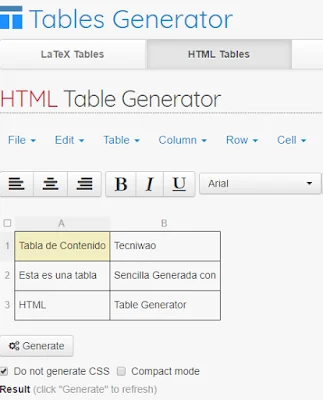
Creating tables in HTML format can be tedious, even for those with coding knowledge, due to the complexity of their structure. However, with TablesGenerator.com, generating tables is easy and fast without needing to install any program.
Below, I’ll show you some of its features that I consider extremely interesting and useful in many cases.
Table of Contents
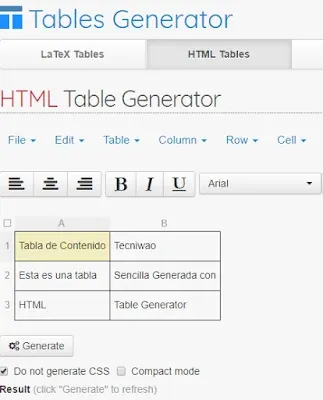
As you can see, this is a simple table. The HTML code to achieve this result would be a bit more complicated:
HTML: html
| Table of Contents | Tecniwao |
|---|---|
| This is a table | Simply Generated with |
| HTML | Table Generator |
As you can observe, the code is much more extensive and complex than the resulting table. With TablesGenerator, we can achieve the same thing in a visually simpler way. Creating an HTML table isn’t difficult in itself; it just requires knowing the <tr> (rows) and <th> (headers) tags, but if you are looking to streamline the process, this tool is much more efficient, especially when you need to generate specifications.
HTML Tables with CSS Styles
An additional advantage is that before generating the HTML code, you can choose whether or not to include CSS styles. If you opt for this, the code changes slightly by adding the styles:
HTML:
<style type="text/css">
.tg  {border-collapse:collapse;border-spacing:0;}
.tg td{font-family:Arial, sans-serif;font-size:14px;padding:10px 5px;border-style:solid;border-width:1px;overflow:hidden;word-break:normal;border-color:black;}
.tg th{font-family:Arial, sans-serif;font-size:14px;font-weight:normal;padding:10px 5px;border-style:solid;border-width:1px;overflow:hidden;word-break:normal;border-color:black;}
.tg .tg-0pky{border-color:inherit;text-align:left;vertical-align:top}
</style>
<table class="tg">
  <tr>
    <th class="tg-0pky">Table of Contents</th>
    <th class="tg-0pky">Tecniwao</th>
  </tr>
  <tr>
    <td class="tg-0pky">This is a table</td>
    <td class="tg-0pky">Simply Generated with </td>
  </tr>
  <tr>
    <td class="tg-0pky">HTML</td>
    <td class="tg-0pky">Table Generator</td>
  </tr>
</table>
Although the code is more extensive due to the inclusion of the CSS styles, the basic structure remains the same. You can compare this code with the previous one to appreciate the differences.
If you are interested in using this tool, here’s the link:
HTML Table Generator - Web Page
Need to generate Markdown tables? Try our Markdown Table Generator.