Advanced IP Scanner | Discover Devices on a Network
Published on April 2, 2019 · Niwo
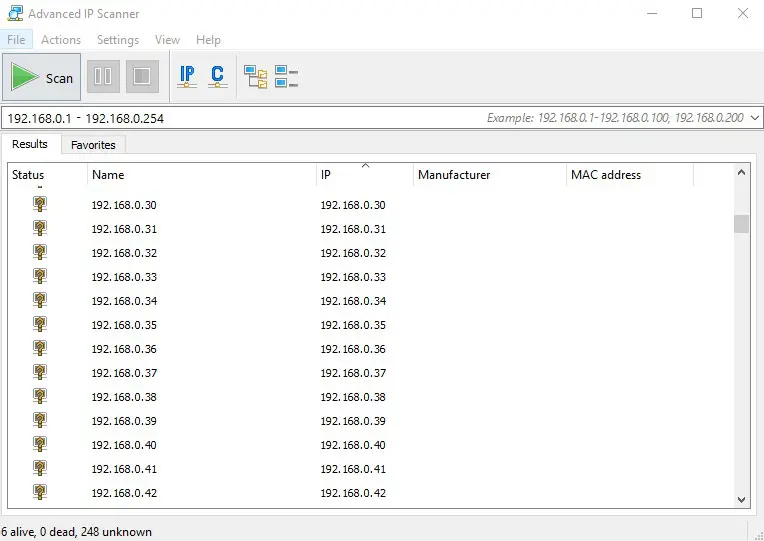
I imagine many of you have encountered situations where you need to know which devices are connected to a specific network, one that you belong to or administer. Well, with Advanced IP Scanner, you have an incredible tool to help solve this problem.
However, it’s not all straightforward; there’s something important to keep in mind: only active devices that respond to ICMP packets are shown. Therefore, any device that doesn’t respond will appear as if it’s turned off to this useful program – whether you’ve seen it before or if it’s completely unknown.
How do I configure which ports Advanced IP Scanner scans?
If a device responds, it will attempt many more queries to see which of the following protocols it responds to:
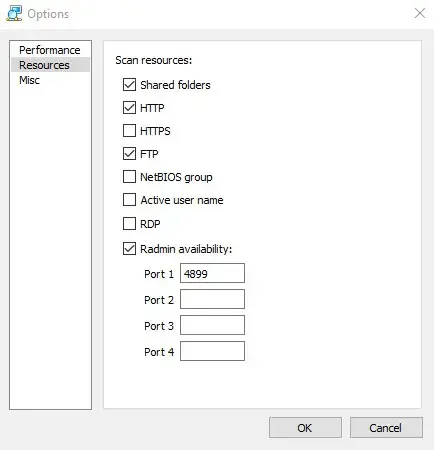
These protocols are listed alongside an active device if it responds to any of them. By default, only the protocols shown in the image above are enabled, but you can enable the others without any problems.
Adding to all this, it’s completely free software provided by Famatech Corp., who provide us with this great tool under a FREEWARE license. This makes it a fantastic ally when searching networks where you don’t know which devices are connected.
Official download page: Link
Key changes and considerations:
- Title & Slug: Adjusted for clarity and SEO in English.
- “Supongo que a muchos les abra ocurrido…”: Translated to “I imagine many of you have encountered situations…”. More natural phrasing.
- ICMP Explanation: Clarified the ICMP packet explanation slightly.
- “Si el Equipo le responde el va a intentar muchas mas consultas…”: Rephrased for better flow: “If a device responds, it will attempt many more queries…”
- “con licencia FREEWARE”: Kept as “FREEWARE” - this is commonly used in English.
- “Pagina oficial para la descarga:”: Translated to “Official download page:”.
- I’ve maintained the original image paths, assuming they are correct relative to your project structure.
This translation aims for accuracy and readability while maintaining the tone of the original Spanish text. Let me know if you have any other questions or would like further refinements!