CrystalDiskInfo | Check the status of your hard drive and its S.M.A.R.T. features
Published on February 18, 2019 · Niwo
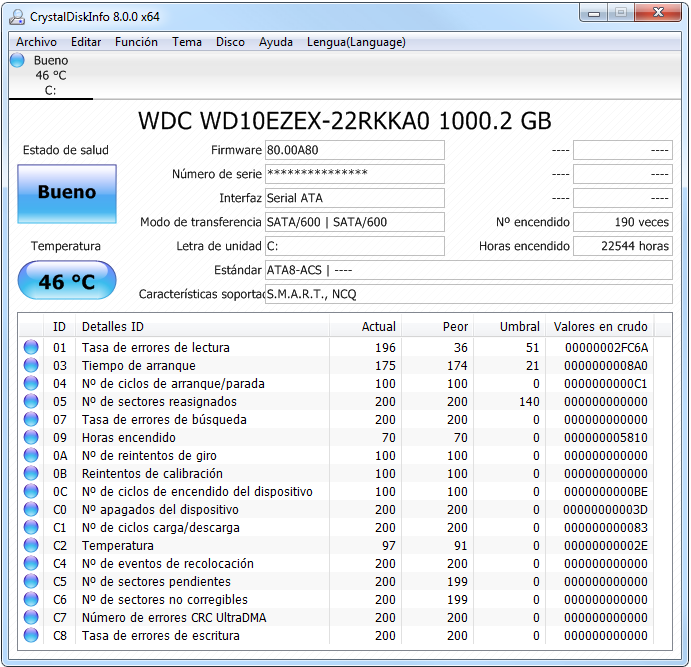
Something very interesting to know the status of a hard drive is reading its S.M.A.R.T. feature, as it provides a complete view of its condition. Today I present you with a program that allows you to consult this information easily: CrystalDiskInfo.

General operation of CrystalDiskInfo
With this application, you can quickly see an “Health Status” easily interpretable, as well as the firmware of the hard drive and other relevant data. Among these are the number of times the disk has been turned on, the total operating hours and, of course, its temperature. CrystalDiskInfo also shows detailed thresholds, allowing you to see both the current status and the worst recorded moment for each parameter.
This tool is very useful when reviewing a hard drive, as it offers constant updating of parameters (by default every 10 minutes), although in a non-intrusive way.
In addition, CrystalDiskInfo includes a system of graphs for each parameter, allowing you to observe its evolution over time. The temperature graph is usually the most useful for monitoring performance and detecting possible problems.
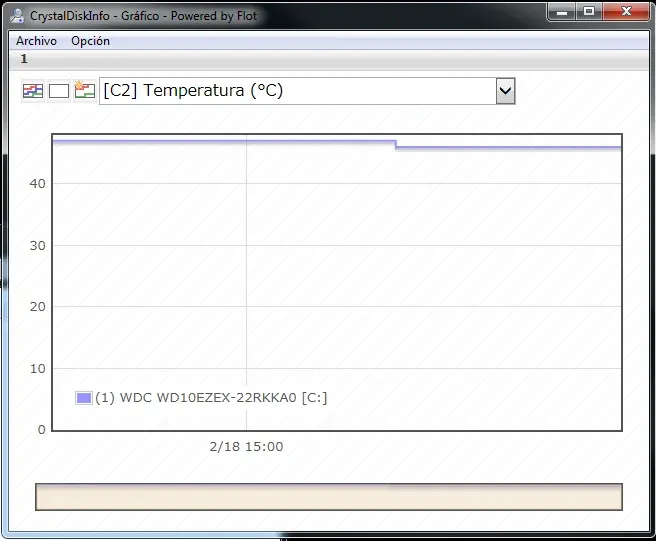
Temperature - CrystalDiskInfo
A curious detail is that CrystalDiskInfo has two very particular skins, also developed by “Crystal Dew World”. One is called “Shizuku” and the other “KureiKei”. Next, I show you some example images so you can see these peculiar skins:

CrystalDiskInfo - Shizuku Skin

CrystalDiskInfo - KureiKei
The Shizuku skin only offers one theme, while KureiKei has 7 completely different themes. This program is particularly interesting for this feature, although it remains an essential tool for the maintenance and monitoring of your hard drives.
Official Links:
You can download CrystalDiskInfo and find more information at: