How to Remove the Person Icon from My Android Phone - Disable Android Accessibility
Published on March 21, 2023 · Niwo

How to remove the person icon from my Android phone? It’s a frequent question, as Android offers features designed to adapt devices for users with vision, motor, or hearing impairments. These functions are generally grouped under the name “Accessibility” and come installed by default on all devices with the Android operating system.

What is the relationship between accessibility and removing the icon of a person?
That button that appears in the lower bar, shaped like a person, is an indicator that the accessibility function is active on your device. To remove it, you must disable the accessibility function or disable all related options.

In most phones, the process is simple:
- Open the Settings application.
- Go to Accessibility.
- Select Advanced Options (if available).
- Find and tap Accessibility Button.
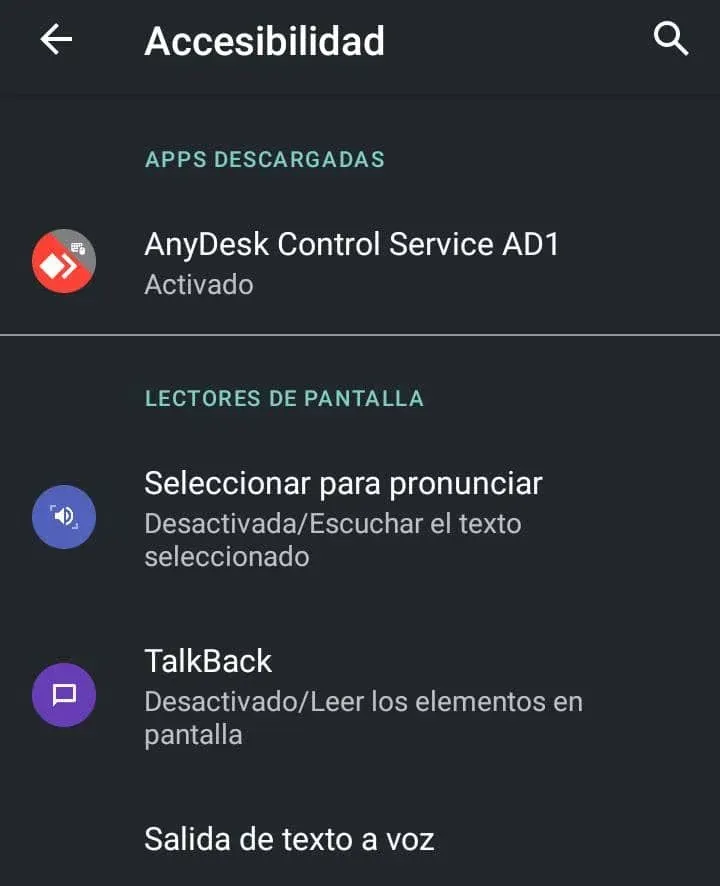
If you don’t find this option in the accessibility menu, it’s possible that an app is enabling the function. Applications like “Anydesk,” for example, require access to accessibility functions to work correctly.
By disabling accessibility for these applications, the person button will disappear. This can be useful if you don’t know which application activated it and find it annoying.
Do you still have doubts about how accessibility works?
If you have any questions or need additional help, leave them in the comments. We will try to answer them if we can help with your particular case. Remember that options and configurations may vary between different Android phone models, especially due to constant updates to the operating system.