RAID Levels Explained: RAID 0, 1, 5, 6, 10 and When to Use Each
Published on June 3, 2026 · Niwo
- What are RAID Levels?
- Software RAID vs. Hardware RAID
- RAID 0 (Striping)
- RAID 1 (Mirroring)
- RAID 5 (Striping with Parity)
- RAID 6 (Dual Parity)
- RAID 10 (Stripe of Mirrors)
- RAID Level Comparison Table
- Which RAID Level Should You Choose?
- By Use Case
- By Number of Disks
- RAID 5 vs RAID 10 — The Most Common Dilemma
- Frequently Asked Questions
- What is the fastest RAID level?
- Can I mix different size drives in RAID?
- Does RAID replace backup?
- What are RAID 50 and RAID 60?
- How many disks do I need for RAID 5?
- Conclusion
What are RAID Levels?
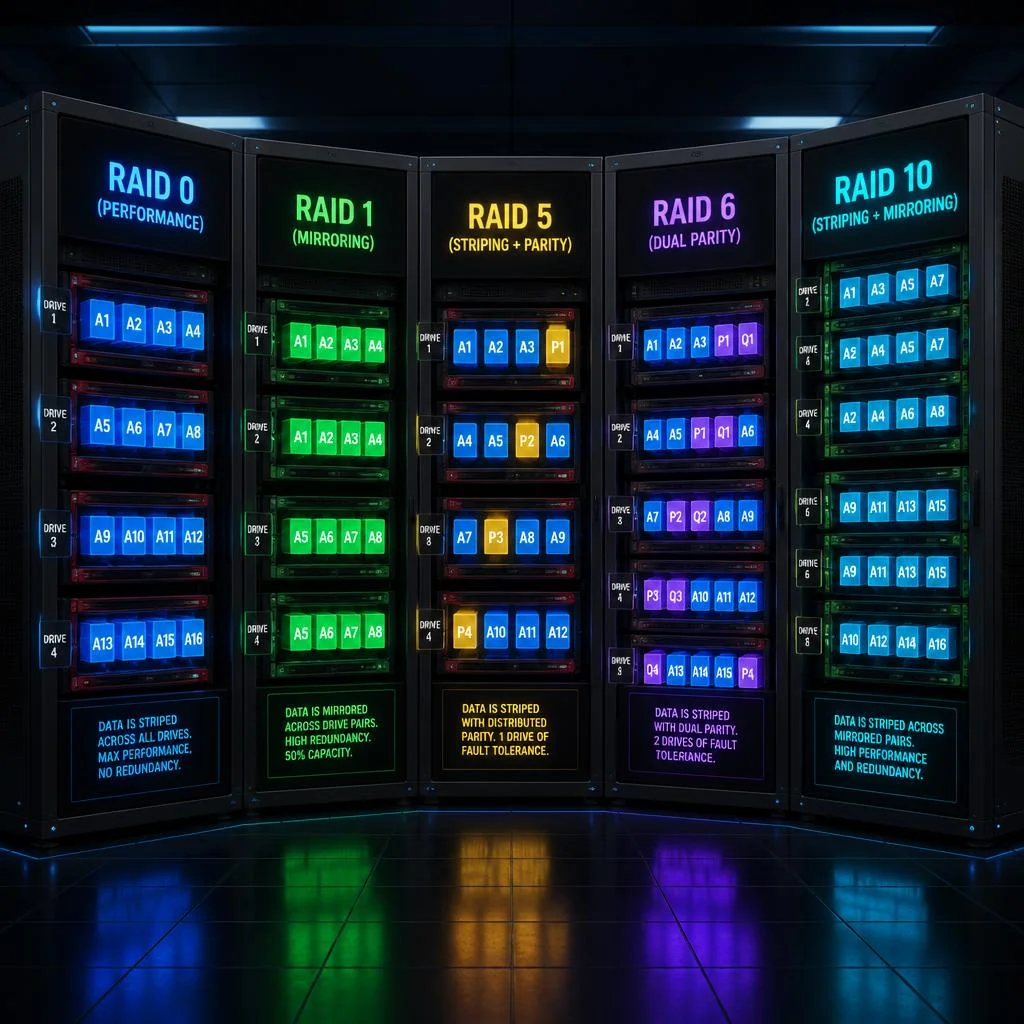
RAID (Redundant Array of Independent Disks) is a storage technology that combines multiple physical drives into a single logical unit to improve performance, fault tolerance, or both. The way drives are organized defines the RAID level — each level applies a different combination of three fundamental techniques:
- Striping: Splitting data into blocks and distributing them across multiple drives for parallel read/write operations.
- Mirroring: Writing identical copies of data to two or more drives for redundancy.
- Parity: Using mathematical calculations (XOR) to reconstruct lost data without fully duplicating it.
The concept was first defined at the University of California, Berkeley in 1987 by David A. Patterson, Garth A. Gibson, and Randy H. Katz. Their seminal paper “A Case for Redundant Arrays of Inexpensive Disks” established the original RAID levels — 0 through 5 — that remain the foundation of modern storage architecture.
Software RAID vs. Hardware RAID
RAID can be implemented in two fundamentally different ways:
Hardware RAID uses a dedicated controller card (a RAID HBA) with its own processor and cache memory. The OS sees only the logical volume, and all parity calculations happen on the controller. This offloads processing from the CPU and typically delivers better performance, especially for parity-based levels like RAID 5 and RAID 6. Premium controllers include battery-backed write cache (BBWC) that protects in-flight writes during power loss.
Software RAID relies on the host CPU to handle all RAID operations through the operating system. Common implementations include mdadm on Linux, Storage Spaces on Windows, and ZFS. Software RAID is more affordable and flexible — you can use any disks and controllers the OS supports — but it consumes CPU cycles for parity calculations, which can impact application performance in write-heavy workloads.
💡 Use our RAID Calculator to compare capacity, fault tolerance, and performance across all RAID levels side by side — enter your disk configuration and see instant results.
RAID 0 (Striping)
How it works: RAID 0 splits data into stripes and writes them across all disks in the array simultaneously. If you have two drives, block A goes to disk 1, block B to disk 2, block C to disk 1, and so on. This creates a data stripe that spans all drives.
graph LR
    subgraph Disk1["Disk 1"]
        direction LR
        A1["Block 1"] --- A3["Block 3"] --- A5["Block 5"] --- A7["Block 7"]
    end
    subgraph Disk2["Disk 2"]
        direction LR
        B2["Block 2"] --- B4["Block 4"] --- B6["Block 6"] --- B8["Block 8"]
    end
- Minimum disks: 2
- Capacity formula: N × (smallest disk capacity) — 100% usable
- Fault tolerance: None — a single disk failure destroys the entire array
- Write penalty: 1 (no overhead)
- Read performance: N × single-disk speed (theoretical)
- Write performance: N × single-disk speed (theoretical)
Best use cases: RAID 0 is designed for speed above all else. It is ideal for gaming storage where large game files benefit from faster load times, video editing scratch disks where real-time 4K/8K footage demands maximum throughput, and temporary cache where data is disposable. Some high-performance computing (HPC) environments use RAID 0 for temporary working directories.
When to avoid it: Never use RAID 0 for irreplaceable data. Because there is zero redundancy, the mean time between failure (MTBF) of the array equals the MTBF of a single drive divided by N — with two drives, your failure probability doubles. RAID 0 without backups is not a storage solution; it’s a performance gamble.
RAID 1 (Mirroring)
How it works: RAID 1 writes every block of data to two (or more) drives simultaneously. Each drive contains an identical copy of the data — a mirror. If one drive fails, the system instantly switches to the mirror with no interruption.
graph LR
    subgraph Disk1["Disk 1 - Primary"]
        direction LR
        A1["Data A"] --- B1["Data B"] --- C1["Data C"] --- D1["Data D"]
    end
    subgraph Disk2["Disk 2 - Mirror"]
        direction LR
        A2["Data A"] --- B2["Data B"] --- C2["Data C"] --- D2["Data D"]
    end
    Disk1 -.-|"identical copy"| Disk2
- Minimum disks: 2
- Capacity formula: Single smallest disk capacity — 50% efficiency
- Fault tolerance: 1 disk (or N−1 if using more than 2 drives)
- Write penalty: 2 (each write goes to both drives)
- Read performance: Up to 2× single-disk speed (theoretical, from split reads)
- Write performance: Single-disk speed
Best use cases: RAID 1 excels where simplicity and immediate recovery matter most. It is the go-to choice for operating system drives on servers and workstations — if the OS disk fails, the system keeps running. It is also ideal for small critical systems (two-drive servers, embedded systems), boot volumes, and configurations where the administrator needs reliable redundancy without the complexity of parity calculations.
Key advantage: RAID 1 has the fastest rebuild time of any redundant RAID level. Since the controller simply copies data from the surviving mirror, there are no parity calculations involved. A 1 TB RAID 1 array can rebuild in a fraction of the time a RAID 5 array of the same capacity would take.
Trade-off: You pay for twice the storage but only use half — a 50% capacity penalty that becomes expensive at scale.
RAID 5 (Striping with Parity)
How it works: RAID 5 stripes both data and parity information across all drives in the array. Parity blocks are distributed — not stored on a dedicated drive — so that any single disk can fail without data loss. The system uses the remaining data blocks plus the parity information to reconstruct the missing data on the fly.
graph LR
    subgraph Disk1["Disk 1"]
        direction LR
        A1["Block 1"] --- P1["Parity 1"] --- A3["Block 4"] --- P3["Parity 3"]
    end
    subgraph Disk2["Disk 2"]
        direction LR
        P0["Parity 0"] --- A2["Block 2"] --- A4["Block 5"] --- P4["Parity 4"]
    end
    subgraph Disk3["Disk 3"]
        direction LR
        A0["Block 0"] --- P2["Parity 2"] --- A5["Block 6"] --- A6["Block 7"]
    end
    style P1 fill:#f9a825,color:#000
    style P0 fill:#f9a825,color:#000
    style P2 fill:#f9a825,color:#000
    style P3 fill:#f9a825,color:#000
    style P4 fill:#f9a825,color:#000
- Minimum disks: 3
- Capacity formula: (N − 1) × smallest disk capacity — 67% to 94% efficiency
- Fault tolerance: 1 disk
- Write penalty: 4 (read-modify-write: 2 reads + 2 writes per small write)
- Read performance: (N − 1) × single-disk speed
- Write performance: Slower than RAID 0/10 due to parity overhead
Best use cases: RAID 5 is the most popular RAID level for general-purpose servers and home/office NAS devices. It offers an excellent balance of usable capacity, read performance, and fault tolerance. Typical deployments include file servers, media storage, email servers, and web hosting environments where multiple users need concurrent read access.
Important considerations for modern drives: With today’s large-capacity HDDs (12 TB, 18 TB, 22 TB+), RAID 5 rebuild times can stretch to 24–72 hours depending on drive speed and controller capability. During this extended rebuild window, the array is vulnerable — if a second drive fails (or an unrecoverable read error occurs during rebuild), all data is lost. This phenomenon, known as URE (Unrecoverable Read Error) risk, has made RAID 5 increasingly controversial for large-capacity drive arrays. Many storage architects now recommend RAID 6 or RAID 10 for arrays with drives larger than 8 TB.
🔍 Compare RAID 5 vs RAID 10 and RAID 5 vs RAID 6 side by side using our RAID Calculator — enter your disk count and size to see exact capacity and IOPS for each level.
RAID 6 (Dual Parity)
How it works: RAID 6 extends RAID 5 by adding a second parity block distributed across all drives. This allows the array to survive two simultaneous disk failures — a critical safety margin for large arrays where rebuild times are measured in days.
graph LR
    subgraph Disk1["Disk 1"]
        direction LR
        D1A["Block 1"] --- D1B["Block 2"] --- P1["Parity 1"] --- Q1["Parity Q1"] --- D1E["Block 5"]
    end
    subgraph Disk2["Disk 2"]
        direction LR
        P0["Parity 0"] --- Q0["Parity Q0"] --- D2C["Block 3"] --- D2D["Block 4"] --- Q4["Parity Q4"]
    end
    subgraph Disk3["Disk 3"]
        direction LR
        P2["Parity 2"] --- Q2["Parity Q2"] --- D3A["Block 6"] --- D3B["Block 7"] --- Q5["Parity Q5"]
    end
    subgraph Disk4["Disk 4"]
        direction LR
        Q3["Parity Q3"] --- D4A["Block 8"] --- P5["Parity 5"] --- Q6["Parity Q6"] --- D4B["Block 9"]
    end
    style P1 fill:#f9a825,color:#000
    style P0 fill:#f9a825,color:#000
    style P2 fill:#f9a825,color:#000
    style P5 fill:#f9a825,color:#000
    style Q1 fill:#e53935,color:#fff
    style Q0 fill:#e53935,color:#fff
    style Q2 fill:#e53935,color:#fff
    style Q3 fill:#e53935,color:#fff
    style Q4 fill:#e53935,color:#fff
    style Q5 fill:#e53935,color:#fff
    style Q6 fill:#e53935,color:#fff
- Minimum disks: 4
- Capacity formula: (N − 2) × smallest disk capacity — 50% to 88% efficiency
- Fault tolerance: 2 disks
- Write penalty: 6 (dual read-modify-write: 3 reads + 3 writes)
- Read performance: (N − 2) × single-disk speed
- Write performance: Slowest among common RAID levels
Best use cases: RAID 6 is the standard for archival storage, backup targets, and large-capacity NAS systems where data protection trumps raw speed. It is particularly well-suited for:
- Media archives with large cold data sets
- Backup repositories (Veeam, Commvault, etc.)
- Surveillance video storage with sequential write patterns
- Object storage backends (MinIO, Ceph) where erasure coding provides additional protection
- Enterprise data centers where drives are hot-swappable and rebuild times span multiple days
The write penalty trade-off: RAID 6’s write penalty of 6 means it delivers only ~17% of raw write IOPS for small random writes. This makes it a poor choice for transactional databases or virtual machine storage. However, for large sequential writes (typical of backups and media), the penalty impact is significantly reduced because the controller can use full-stripe writes that avoid the read-modify-write cycle.
RAID 10 (Stripe of Mirrors)
How it works: RAID 10 (also called RAID 1+0) combines mirroring and striping in a two-layer architecture. First, disks are paired into mirrored sets (RAID 1). Then, data is striped across all mirror sets (RAID 0). This gives you the redundancy of mirroring with the performance of striping.
graph TB
    subgraph Set1["Mirror Set 1 (RAID 1)"]
        direction LR
        Disk1a["Disk 1<br/>Block A"] --- Disk1b["Disk 2<br/>Block A'"]
    end
    subgraph Set2["Mirror Set 2 (RAID 1)"]
        direction LR
        Disk2a["Disk 3<br/>Block C"] --- Disk2b["Disk 4<br/>Block C'"]
    end
    subgraph Stripe["Stripe across sets (RAID 0)"]
        direction LR
        Set1 --- Set2
    end
    style Disk1a fill:#2ecc71,color:#fff
    style Disk1b fill:#2ecc71,color:#fff
    style Disk2a fill:#3498db,color:#fff
    style Disk2b fill:#3498db,color:#fff
- Minimum disks: 4 (in pairs)
- Capacity formula: (N / 2) × smallest disk capacity — 50% efficiency
- Fault tolerance: Up to N/2 disks (at most one per mirror set)
- Write penalty: 2 (each write goes to both disks in a mirror set)
- Read performance: N × single-disk speed (theoretical max)
- Write performance: N/2 × single-disk speed
Best use cases: RAID 10 is the gold standard for performance-critical, mission-critical applications. It is the preferred RAID level for:
- Relational databases (MySQL, PostgreSQL, SQL Server, Oracle) — small random writes love the low write penalty
- Virtual machine hypervisors (VMware vSphere, Proxmox, Hyper-V) where multiple VMs share the same storage
- High-transaction applications (ERP, CRM, email servers)
- OLTP systems where every millisecond of I/O latency matters
RAID 10 vs RAID 5 — the database debate: For write-intensive workloads, RAID 10 consistently outperforms RAID 5. With a write penalty of 2 vs. 4, RAID 10 delivers twice the effective write IOPS from the same physical disks. The trade-off is 50% capacity efficiency — you need 8 drives to match the usable space of 5 drives in RAID 5. When storage costs are secondary to performance, RAID 10 is the clear winner.
Critical advantage: Unlike RAID 5 or RAID 6, RAID 10 rebuilds at full disk speed because it’s a simple mirror copy — no parity reconstruction needed. This minimizes the vulnerability window during drive replacement.
RAID Level Comparison Table
The table below provides a quick-reference comparison of the five most common RAID levels. Use it alongside our RAID Calculator to make informed storage decisions.
| Feature | RAID 0 | RAID 1 | RAID 5 | RAID 6 | RAID 10 |
|---|---|---|---|---|---|
| Minimum disks | 2 | 2 | 3 | 4 | 4 |
| Usable capacity | N × disk | 1 × disk | (N−1) × disk | (N−2) × disk | (N/2) × disk |
| Fault tolerance | None | 1 disk | 1 disk | 2 disks | 1 per mirror |
| Storage efficiency | 100% | 50% | 67–94% | 50–88% | 50% |
| Read performance | N× | 2× (theoretical) | (N−1)× | (N−2)× | N× |
| Write performance | N× | 1× | (N−1)× (parity) | (N−2)× (dual parity) | N/2× |
| Write penalty | 1 | 2 | 4 | 6 | 2 |
| Rebuild speed | N/A | Fast | Slow | Slowest | Fast |
| Best for | Speed/cache | Critical small systems | General servers | Archives, backups | Databases, VMs |
💡 Pro tip: The write penalty is the single most important metric for estimating database and VM performance. A RAID 10 array with 4 SSDs delivers roughly 3× the write IOPS of the same 4 SSDs in a RAID 5 configuration. Calculate exact IOPS for your setup with our RAID Calculator.
Which RAID Level Should You Choose?
There is no single “best” RAID level — the right choice depends entirely on your workload’s balance of performance, capacity, and protection. Here is a decision framework:
By Use Case
| If you need… | Choose… | Why |
|---|---|---|
| Maximum speed, data is disposable | RAID 0 | 100% capacity, no overhead, N× read/write |
| Simple redundancy, 2 drives only | RAID 1 | Instant failover, fastest rebuild |
| Balanced storage, 3+ drives | RAID 5 | Good capacity + 1-drive tolerance |
| Enterprise protection, large drives | RAID 6 | Survives 2 failures, safe for 12 TB+ |
| Database performance + redundancy | RAID 10 | Best write IOPS, fast rebuild, 50% efficiency |
By Number of Disks
- 2 disks: Your only redundant option is RAID 1. RAID 0 gives capacity but no safety.
- 3 disks: RAID 5 is the sweet spot — (N−1) capacity with one-drive fault tolerance.
- 4 disks: The most interesting decision point. RAID 5 gives you 3× capacity (75% efficient) but higher write penalty. RAID 6 gives 2× capacity with dual parity. RAID 10 gives 2× capacity with best performance. Choose based on your priority.
- 6+ disks: RAID 6 efficiency improves (67%+ at 6 disks), and RAID 10 remains strong for performance workloads. RAID 5 becomes riskier at scale due to long rebuild times.
- 8+ disks: Consider nested RAID levels like RAID 50 or RAID 60, or move to ZFS/ZFS RAID-Z with variable-width vdevs.
RAID 5 vs RAID 10 — The Most Common Dilemma
This is the most debated RAID decision in IT. Here is the simplified answer:
Choose RAID 5 when:
- You need maximum usable capacity
- Your workload is read-heavy (media streaming, file serving, backups)
- You can tolerate slower writes
- You have small-capacity drives (< 8 TB) or fast rebuild paths
Choose RAID 10 when:
- Your workload is write-heavy (databases, VMs, transactional systems)
- You need consistent low-latency I/O
- Rebuild speed matters (RAID 10 rebuilds 3-5× faster than RAID 5)
- Capacity is less important than performance
Frequently Asked Questions
What is the fastest RAID level?
RAID 0 is the fastest RAID level for both reads and writes, since it stripes data across all drives with no parity overhead and a write penalty of 1. Among redundant RAID levels, RAID 10 offers the best overall performance — it matches RAID 0’s read speed and delivers excellent write performance with a penalty of only 2. For pure sequential throughput, RAID 0 with multiple drives is unmatched, but RAID 10 is the fastest option when you need both speed and protection.
Can I mix different size drives in RAID?
Technically yes, but with a major caveat: the capacity of every drive is limited to the smallest drive in the array. If you mix a 4 TB drive with a 2 TB drive, the 4 TB drive is treated as 2 TB, wasting 2 TB of capacity. This applies to all standard RAID levels. Advanced systems like Synology Hybrid RAID (SHR) and ZFS handle mixed drive sizes more efficiently by creating virtual partitions. For traditional RAID, always use identical model and capacity drives for optimal performance and capacity. Our RAID Calculator automatically accounts for this — enter your disk sizes and it shows exact usable capacity.
Does RAID replace backup?
No — this is the most dangerous misconception in storage. RAID protects against physical disk failure, which is just one of many threats to your data. RAID does not protect against:
- Human error (accidental deletion,
rm -rf, overwrites) - Ransomware and malware (encrypts or corrupts all mounted drives, including mirror/parity)
- Software corruption (filesystem bugs, application-level data corruption)
- Theft or physical destruction of the entire system
- Natural disasters (fire, flood, earthquake)
A proper backup strategy follows the 3-2-1 rule: three copies of your data, on two different media types, with at least one copy off-site. RAID and backups are complementary — RAID keeps you online when a drive fails; backups keep your data safe when everything else goes wrong.
What are RAID 50 and RAID 60?
RAID 50 (RAID 5+0) combines RAID 5 striping with parity across multiple RAID 5 arrays striped together. It requires a minimum of 6 drives. RAID 50 offers better performance than RAID 5 alone and can tolerate up to one disk failure per sub-array. It is used in high-performance file servers and video production environments.
RAID 60 (RAID 6+0) combines RAID 6 dual parity across multiple RAID 6 arrays striped together. It requires a minimum of 8 drives. RAID 60 offers even greater fault tolerance (up to two failures per sub-array) with improved performance over single RAID 6. It is common in large enterprise storage systems and data centers with 12+ drive arrays.
Both are considered nested RAID levels and are best managed through enterprise RAID controllers with dedicated cache and processing power.
How many disks do I need for RAID 5?
RAID 5 requires a minimum of 3 disks. The usable capacity is (N − 1) × the capacity of the smallest drive. Here are common configurations:
| Total drives | Each drive | Raw capacity | Usable (RAID 5) | Efficiency |
|---|---|---|---|---|
| 3 | 4 TB | 12 TB | 8 TB | 67% |
| 4 | 4 TB | 16 TB | 12 TB | 75% |
| 5 | 4 TB | 20 TB | 16 TB | 80% |
| 8 | 4 TB | 32 TB | 28 TB | 88% |
| 12 | 4 TB | 48 TB | 44 TB | 92% |
While 3 drives is the minimum, most professionals recommend 4 to 8 drives for RAID 5. Beyond 8 drives, the rebuild time becomes a significant risk factor, and RAID 6 or RAID 10 becomes more appropriate. Use our RAID Calculator to find the optimal configuration for your specific drives and requirements.
Conclusion
Choosing the right RAID level is one of the most consequential storage decisions you will make as a sysadmin, devops engineer, or IT professional. Each level represents a distinct trade-off between performance, capacity, and fault tolerance:
- RAID 0 gives maximum speed but zero protection
- RAID 1 offers simple, fast redundancy for small systems
- RAID 5 balances capacity, performance, and protection for general use
- RAID 6 provides enterprise-grade dual-parity safety for large drives
- RAID 10 delivers uncompromising performance with solid redundancy
The key takeaway: no RAID level replaces a backup strategy. RAID protects against drive failure, not against human error, ransomware, or site disasters. Always pair your RAID configuration with an independent backup solution following the 3-2-1 rule.
Ready to plan your storage? Use the Tecniwao RAID Calculator to compare RAID 0, 1, 5, 6, and 10 side by side — enter your disk count, capacity, and type to see exact usable capacity, effective IOPS, fault tolerance, and write penalty for each level. No signup required, results instantly.