Google Analytics in Blogger | How to Install it and View Your Website Traffic
Published on March 22, 2020 · Niwo
Google Analytics in Blogger is, without a doubt, the most useful and free tool to get your first impressions of your website’s performance. Starting blindly can be uncertain, especially on the internet, where there are millions of users, but we don’t know if they are actually reaching our site. Google Analytics provides us with that crucial information: knowing if we have an audience interested in what we write and which we dedicate so much effort to.
How to implement Google Analytics in our Blogger blog?
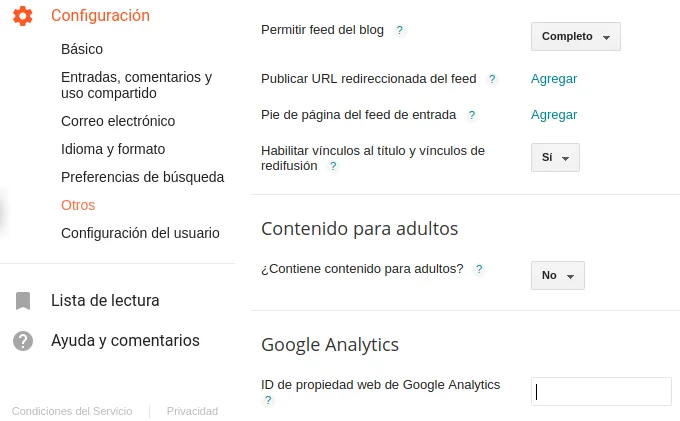
Blogger greatly facilitates this process, as it usually does with configurations. They take the trouble to offer us a complete menu of options so that we don’t even need to edit our template. All of this is found in Settings -> Other -> Google Analytics. There we just have to place our tracking code (tracking ID) and we will be ready.
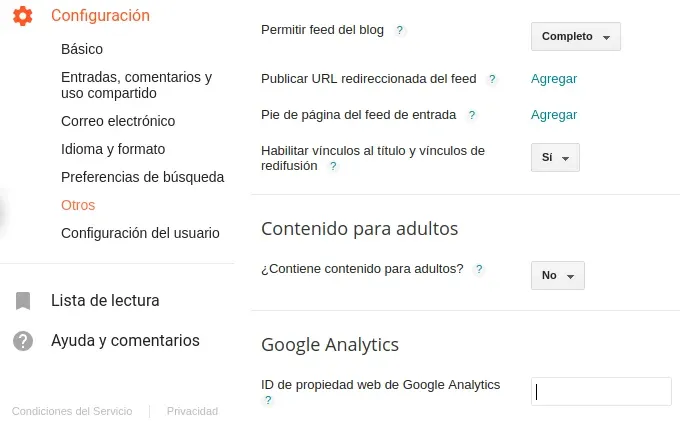
Other Menu of Blogger
Why not use Blogger’s internal Analytics?
It is true that Blogger has an internal analytics system that tells us how many visits each of our posts has had. However, this system counts absolutely all visits, both ours and those of real visitors.
In the long run, this becomes inefficient because it will tell us that an article had 500 thousand visits, but we won’t know over what period of time those visits occurred or if the article recently went viral. Therefore, we strongly recommend implementing Google Analytics on your website to obtain more accurate and useful data.
Don’t know where to get this Google Analytics code or tracking ID?
We have an article dedicated to how to obtain this code or tracking ID from Google Analytics. You can visit it below:
How to implement Google Analytics on my Website?