Process Explorer | The Most Comprehensive Process Explorer for Windows
Published on April 20, 2017 · Niwo
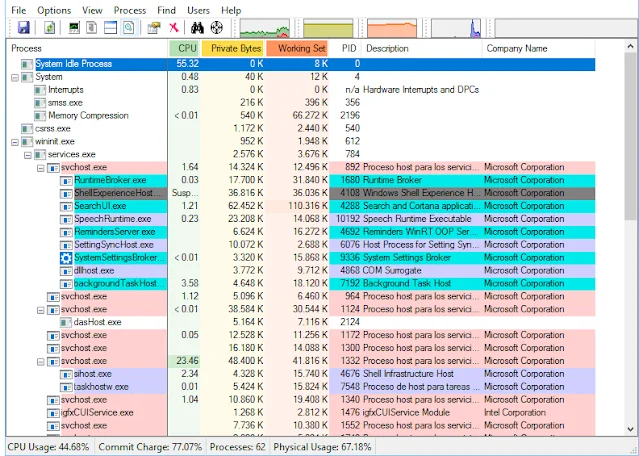
Have you ever opened Task Manager in Windows and felt overwhelmed by the number of processes listed, unsure which ones are legitimate and which might be potentially harmful? In that case, Process Explorer is an essential tool. It’s a very comprehensive and free process explorer offered by the Windows Sysinternals team, known for its reliability.
Process Explorer running on Windows 10
What Does Process Explorer Do?
Process Explorer presents processes in a much more organized way than Task Manager, displaying key information such as memory usage, CPU usage, and the process ID (PID). It also provides details about the vendor and a description – data that typically requires extra effort to obtain in Task Manager.
But its most notable feature is the ability to automatically send a hash of each process to VirusTotal. This allows you to verify whether the process has been identified as potentially malicious by the VirusTotal database, providing an extra layer of security.
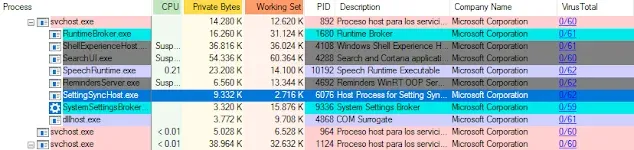
This feature lets you visually identify suspicious processes on your system. Furthermore, Process Explorer offers various resource monitoring tools that allow you to analyze system usage in greater detail than Task Manager.
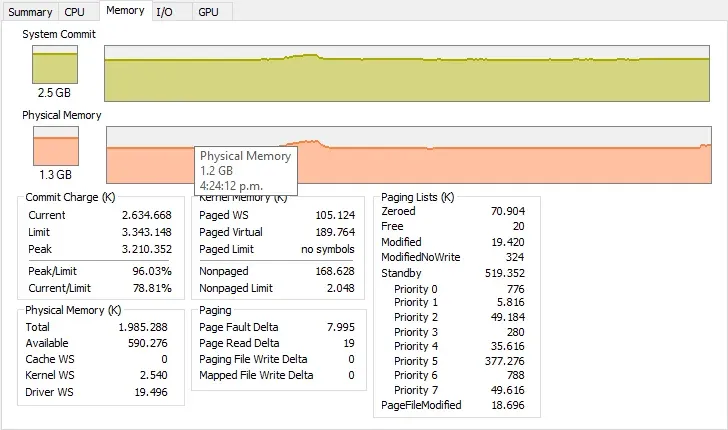
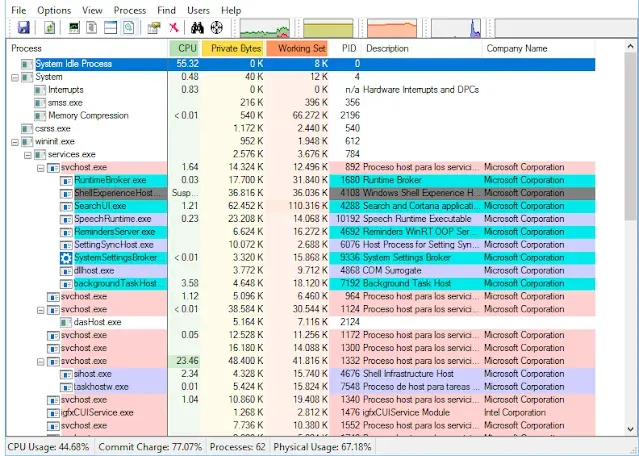
Process Explorer showing all RAM memory usage data
As you can see in the image, it provides a wealth of additional information compared to Task Manager. While it doesn’t completely replace it, it offers a much more comprehensive and useful reference for diagnosing problems. In addition to memory usage, it displays CPU and GPU breakdowns, which can be very valuable for understanding system failures.
In short, Process Explorer is a very complete and totally free software available on the Windows Sysinternals website: https://technet.microsoft.com/en-us/sysinternals/processexplorer.aspx