SpeedFan | Easy and Fast PC Temperature Monitor
Published on April 2, 2019 · Niwo
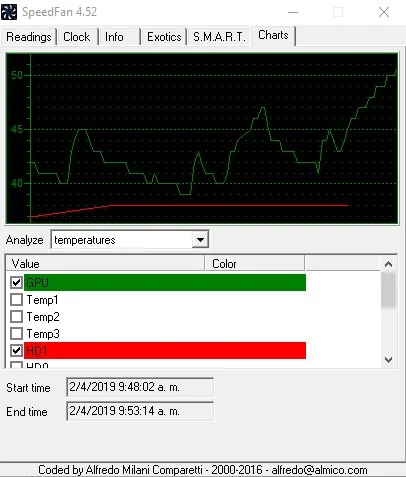
Seeing temperature sensors in real time isn’t something most PC users do regularly, as there’s no native way to display them. Therefore, if you need this information, resorting to powerful programs like SpeedFan is an excellent option.

SpeedFan - Alfredo Milani Comparetti
What can we do with SpeedFan?
With this tool, you can visualize a simple but effective monitor of your PC’s temperatures. It’s important to remember that this will only be displayed if your system has the necessary sensors. Additionally, you can make adjustments to the voltage, although I don’t recommend it unless you have advanced knowledge.

SpeedFan - Alfredo Milani Comparetti
SpeedFan also offers a well-organized monitor with all the relevant values of your PC, allowing you to not only see the temperature but also the fan speed, voltage and usage of both hard drives and CPU, along with additional data.


Furthermore, SpeedFan allows you to create graphs of temperature, voltage, and fan speed, as well as verify the S.M.A.R.T. status of your hard drive to detect possible errors.
Why should I care about my fan speeds?
As we know, temperature is a crucial factor in PC performance, so keeping the cooling system in optimal condition is a priority. If we don’t give our equipment proper maintenance and want to use it for extended periods, we risk overheating it.
Overheating can cause anything from an unexpected shutdown of your computer to more serious failures. Therefore, it’s essential to monitor your PC’s ventilation with SpeedFan.
Conclusion and official site
In short, SpeedFan is a complete software that developer Alfredo Milani offers through Almico.com, where you can download it for free.
Official website for the download: SpeedFan