WinDirStat | Analyze Your Hard Drive Usage Easily and Simply
Published on April 19, 2017 · Niwo
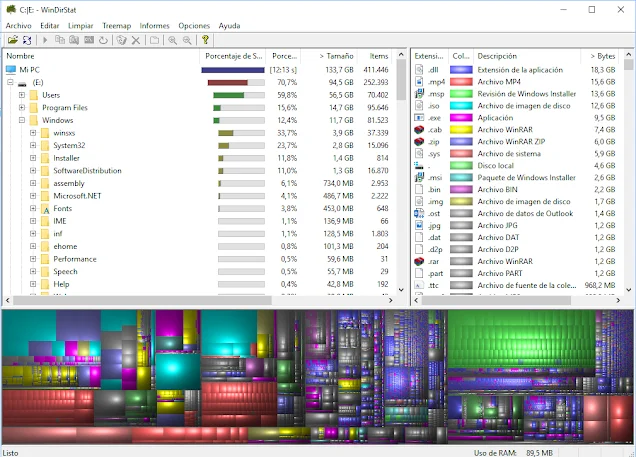
WinDirStat is an excellent tool for analyzing disk space usage, not as an antivirus or infection search system, but to organize and visualize how your storage is being used. It shows you where the largest amount of content is stored and which files are the biggest, allowing you to identify what’s consuming your hard drive.
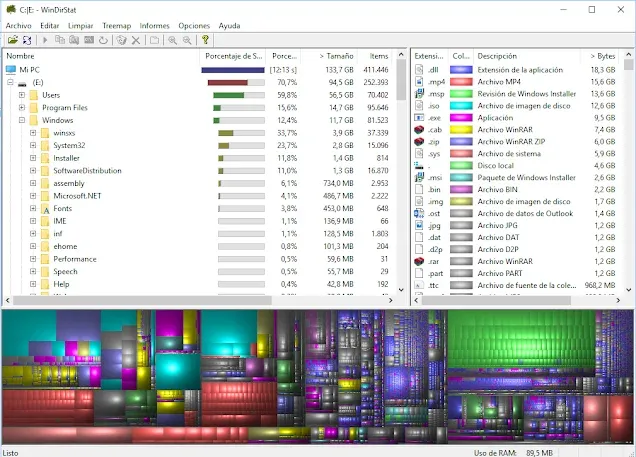
As you can see in the image, WinDirStat shows disk usage by folders and file types. The TreeMap graph below is especially useful for checking the size of each file; the larger the box, the greater its weight.
Furthermore, it has practical features such as “Open an Explorer in the selected path,” which allows you to quickly access the location you want to review.
The official program page mentions alternatives for Linux and macOS, which I plan to analyze in future posts.
Official Page: https://windirstat.net/
How to use WinDirStat to identify what’s consuming space on your hard drive?
The process is very simple. After analyzing your disk, you only need to locate the largest blocks. The colors also indicate the file type, which makes identification easier even if it’s many small files.
Simply review and validate which are the largest blocks. However, always omit system files and the “Pagefile.sys” file. The latter is an essential file for Windows paging and should not be deleted while using the computer.
Need to convert between storage units? Try our Storage Calculator.